SAP ABAP INTERVIEW QUESTION PART-1
Enhancements:
Q1: What is the reason
for using enhancements?
A1: Normal programs don’t give us
all the functionalities we may need, so to fix this we can use the R/3
enhancements that will permit us to insert our particular functionality to any
normal SAP program.
Q2: What is the meaning
of customer development?
A2: Customer development generates objects particular to the customers
in their name range.
Q3: What weaknesses do
we find when using modification?
A3: One of the weaknesses is that we could have errors when standard
code is modified. This automatically leads to a higher amount of work when
software upgrades are made.
Q4: Why should we
choose to make modifications?
A4: Customer exits don’t exist in every screen and program from R/3,
and because they can be used just if they are already existing in SAP R/3,
sometimes we must choose to make modifications.
Q5: What is the meaning
of a screen exit?
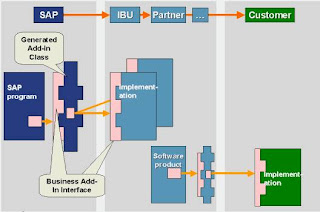
A5: Screen exits means to add fields to R/3 screens, SAP generates
screen exits by deploying particular sub screen areas in a normal R/3 screen
and then invoking customer subscreens from the normal flow logic of dynpro.
Q6: What is the way in
which exit organizing is made by SAP?
A6: An organizing exit package of SAP is also found under the name of
SAP enhancements and every SAP enhancement can have several particular exits.
Q7: What is the meaning
of user exits, how are they written and which measures do we have to take for
prevention?
A7: In the default standards of SAP we can
find the user defined functionalities, we can find a Sap program in which a
customer personal program may be invoked. Unlike customer exits. user exits can
permit the developers to enter and change the parts of the program and also the
objects. When upgrade is made , every user exit has to be verified for
conformation to the standard system. The user exits can use INCLUDES, case in
which Customizing makes the management. We have to search for those customer
enhancements from a specific development class.
Q8: Can we classify the
enhancements by type?
A8: Yes they can be classified in: a) enhancements that use customer
exits and b) enhancements of the elements in the ABAP/4 Dictionary.
a) The standard software doesn’t incorporate all
the requirements of the customer, but they can be contained as empty ‘shells’
that can be changed by the customers by inserting their personal codes. The
enhancements can refer to menus, screens or programs, the compatibility being
assured. This means that in SAP guarantees that the compatibility will be
maintained even when passing from standard software to exit and the interface
invoking the exit (they will be kept for future versions too).
b) These are enhancements like table appends or
text enhancements or field exits (supplementary coding for data elements).
Q9: What is the meaning
of SSCR?
A9: The SAP Software Change Registration or
SSCR is the operational that makes possible the registration of every manual
change of the SAP source coding and objects of SAP Dictionary.
Q10: What are the strong
features of enhancements?
A10: They don’t have an
impact on the standard source code of SAP, they don’t have an impact on
software upgrades.
Q11: Which are the main
types of customer exits?
A11: The main types of customer exits are:
the screen exits, the menu exits, the function module exits and the keyword
exits.
Q12: What is the
meaning of function module exit?
A12: The function module exit is meting
supplementary functionality in R/3 programs having a big role in the menu exits
and the screen exits.
Q13: What is the
meaning of an add-on project?
A13: For using in the best way the exits we find in the standard R/3
programs we have to make an add-on project, that makes possible organizing the
enhancement packs and the exits we desire to use. An add-on project makes
possible to met add-on functionality on the texts from the SAP enhancements.
Q14: What is the
meaning of a keyword exit?
A14: With a keyword exit we can give to the
data elements of the keywords from the ABAP/4 dictionary some documentation. This
documentation will be shown by the system every time users hit the F1 key for
obtaining help online regarding a screen field.
Q15: What is the
meaning of a menu exit?
A15: Menu exits mean when we add item on the pull down menus.
Q16: How can we
separate enhancements from modifications?
A16: When we create modifications on the functionality of the SAP
standard we say modifications. When we put supplementary functionality
on the standard functionality of SAP we say enhancements.
Q17: What is the meaning
of customizing?
A17: When we configure
the system parameters through the SAP interface we mean customizing.
A18: How can we
classify the methods in which we generate modifications in the standard
software of SAP?
A18: We can make: enhancements to the
standard of SAP, modifications to the standard of SAP, customizing and customer
development.
Interview questions on enhancements in abap sap abap
enhancements interview questions enhancements in sap abap interview questions
abap enhancements interview questions
SAP Memory
SAP memory is the memory area where all main sessions with
in the SAP GUI have the access. We can use SAP memory either
to pass data from one program to other within the session, or to pass data from
one session to other. Application programs that
use SAP memory must do so using SPA/GPA parameters (also known as SET/GET
parameters). These parameters can be set
either for a particular user or for a particular program using the SET
PARAMETER statement. Other ABAP programs can then retrieve
the set parameters using the GET PARAMETER statement. The most frequent use of
SPA/GPA parameters is to fill input fields on
screens
ABAP/4 Memory
ABAP memory is the memory area that all ABAP programs
within the same internal session can access using the EXPORT and
IMPORT statements. Data within this area remains intact during a whole sequence
of program calls. To pass data
to a program which you are calling, the data needs to be placed in ABAP memory
before the call is made. The internal session of
the called program then replaces that of the calling program. The program
called can then read from the ABAP memory. If control is
then returned to the program which made the initial call, the same process
operates in reverse.
SAP memory
The SAP memory, otherwise known as the global memory, is available to a user
during the entire duration of a terminal session. Its
contents are retained across transaction boundaries as well as external and
internal sessions. The SET PARAMETER and GET
PARAMETER statements allow you to write to, or read from, the SAP memory.
ABAP/4 memory
The contents of the ABAP/4 memory are retained only during the lifetime of an
external session (see also Organization of
Modularization Units). You can retain or pass data across internal sessions.
The EXPORT TO MEMORY and IMPORT FROM
MEMORY statements allow you to write data to, or read data from, the ABAP
memory.
Views
Data about an application object is often distributed on
several tables. By defining a view, you can define an application-dependent
view
that combines this data. The structure of such a view is defined by specifying
the tables and fields used in the view. Fields that are not
required can be hidden, thereby minimizing interfaces. A view can be used in
ABAP programs for data selection.
The data of a view is derived from one or more tables, but
not stored physically. The simplest form of deriving data is to mask out one or
more fields from a base table (projection) or to include only certain entries
of a base table in the view (selection). More complicated views
can comprise several base tables, the individual tables being linked with a
relational join operation. See also Join, Projection and Selection.
The base tables of the view must be selected in the first
step of a view definition. In the second step, these tables must be linked by
defining the join conditions. It is also possible to use the join condition
from a foreign key defined between the tables (see Foreign Key
Relationship and Join Condition). In the third step, you must select the fields
of the base tables to be used in the view. Selection conditions
that restrict the records in the view can be formulated in the fourth step.
Four different view types are supported. These differ in
the way in which the view is implemented and in the methods permitted for
accessing the view data.
Database views are implemented with an equivalent view on
the database.
Projection views are used to hide fields of a table (only projection).
Help views can be used as selection method in search helps.
Maintenance views permit you to maintain the data distributed on several tables
for one application object at one time.
Database views implement an inner join. The other view types implement an outer
join (see Inner and Outer Join).
The join conditions for database views can be formulated
using equality relationships between any base fields. The join conditions for
the
other view types must be obtained from existing foreign keys. Tables therefore
can only be combined in a maintenance view or help view if
they are linked to one another with foreign keys.
The maintenance status defines whether you can only read
data with the view or whether you can also insert and change data with it.
Creating a Database View
Procedure
Enter an explanatory short text in the field Short text.
You can for example find the view at a later time using this short text.
Define the tables to be included in the view in the Tables
field of the Tables/Join conditions tab page.
Keep in mind that you can only include transparent tables in a database view.
Link the tables with join conditions.
If there are suitable foreign keys between the tables, you should copy the join
conditions from these foreign keys (see Foreign Key
Relationships and Join Conditions).
Place the cursor on a table name and choose Relationships.
All foreign keys to other tables defined for this table are displayed. Select
the
foreign keys and choose Copy. The join condition is now derived from the
definitions in the foreign key.
If you only want to see the foreign key relationship
existing between two tables, you must first select these two tables (click on
the first
column of the input area Tables) and then choose Relationships.
On the View fields tab page, select the fields that you want
to copy to the view.
Choose Table fields. All the tables contained in the view are displayed in a
dialog box. Select a table. All the fields contained in this table are
displayed. You can copy fields by selecting them in the first column and
choosing Copy.
You can also include an entire table in the view (see
Includes in Database Views).
On the Selection conditions tab page, you can (optionally)
formulate restrictions for the data records to be displayed with the view (see
Maintaining Selection Conditions for Views).
The selection conditions define the data records that can be selected with the
view.
With Goto ® Technical settings, you can (optionally)
maintain the technical settings of the database view.
You can define whether and how the database view should be buffered here.
Proceed as for the technical settings of a table (see
Maintaining Technical Settings). Note that only the settings for buffering can
be maintained for database views.
On the Maintenance status tab page, select the maintenance
status of the database view.
If the view contains more than one table, the maintenance status read only
cannot be altered.
Save your entries. You are asked to assign the view a
development class.
You can change this development class later with Goto ® Object directory entry.
Choose.
Result
When a database view is activated, the corresponding view
is also automatically created in the database if the base tables of the view
were already created there.
At activation, a log is written; it can be displayed with
Utilities ® Activation log. If errors or warnings occurring when the view was
activated,
they are displayed directly in the activation log.
If the base tables are not yet created in the database,
this is recorded in the activation log. The view is nevertheless activated in
the ABAP
Dictionary. In this case you can create the relevant view on the database later
with the database utility.
Other Options
Create documentation: You can create information about
using the view with Goto ® Documentation. This documentation is also output for
example when you print the view.
Change data element of a view field: Select the Mod (Modify) column in the View
fields tab page. The Data element field is now ready for
input. You can enter a data element that refers to the same domain as the data
element of the assigned table field here. Cancel the Mod
flag if you want to use the data element of the assigned table field again.
Display view data: With Utilities ® Contents you can determine which data can
be selected with the view.
Display create statement: With Extras ® CREATE statement you can display how
the view was created in the database. The statement that
was executed when the version of the view currently being edited was created in
the database is displayed.
Check the definition of the view in the database: With Utilities ® Database
object ® Check you can determine whether the definition of the
view in the database is consistent with the active version of the view. With
Utilities ® Database object ® Display you can display the
definition of the view in the database.
Check the runtime object of the view: With Utilities ® Runtime object ® Check
you can determine whether the definition of the view in the
ABAP Dictionary maintenance screen is identical to the specifications in the runtime
object of the view. With Utilities ® Runtime object ®
Display you can display the runtime object of the view.
Creating Maintenance Views
Procedure
Enter an explanatory short text in the field Short text.
You can for example find the view at a later time using this short text.
Enter the primary table of the view under Tables in the
Tables/Join conditions tab page.
Only those tables that are linked with the primary table (indirectly) with a
foreign key can be included in the maintenance view.
If required, include more tables in the view. In a
maintenance view you can only insert tables that are linked to one another with
foreign
keys.
Place the cursor on the primary table and choose Relationships. All existing
foreign key relationships of the primary table are displayed.
Select the required foreign key and choose Copy. The secondary table used in
such a foreign key is included in the view. The join conditions
derived from the foreign keys (see Foreign Key Relationship and Join Condition)
are displayed.
You can also insert tables that are linked by foreign key
with one of the secondary tables that was already inserted. To do this, place
the
cursor on the secondary table and choose Relationships. Then proceed as
described above.
For maintenance and help views, there are certain
restrictions on the foreign keys with which the tables can be included in the
view (see
Restrictions for Maintenance and Help Views). The foreign keys violating these
conditions are displayed at the end of the list under the
header Relationships with unsuitable cardinality.
On the View fields tab page, select the fields that you
want to copy to the view.
Choose Table fields. All the tables contained in the view are displayed in a
dialog box. Select a table. The fields of the table are now
displayed in a dialog box. You can copy fields by selecting them in the first
column and choosing Copy.
All key fields of the primary table must be included in a
maintenance view. In addition, all key fields of secondary tables that are not
involved in the foreign key (that is, which are not linked via a join condition
to a key field already included in the view) must be included in
the view.
This ensures that the records inserted with a maintenance
view can be written correctly in the tables contained in the view.
On the Selection conditions tab page, you can (optionally)
formulate restrictions for the data records that can be displayed with the view
(see Maintaining Selection Conditions for Views).
The selection conditions define the data records that can be selected with the
view.
In the Maintenance status tab page, define the maintenance
status of the view.
The maintenance status defines how you can access the view data with the
standard maintenance transaction (SM30).
Choose.
At activation, a log is written; it can be displayed with Utilities ®
Activation log. If errors or warnings occurring when the view was activated,
the activation log is automatically displayed.
Go to Transaction SE54 with Environment ®
Tab.maint.generator.
From the view definition you can generate maintenance modules and maintenance
interfaces that distribute the data entered with the view
to the base tables of the view. You can find more information in Creating a
Maintenance Dialog.
Other Options
Recording documentation: You can create
information about using the view with Goto ® Documentation. This documentation
is output for
example when you print the view.
Changing the data element of a view field: Select column Mod (modification) for
the view field. The Data element field is now ready for input.
You can enter a data element that refers to the same domain as the data element
of the assigned table field here. Cancel the Mod flag if
you want to use the data element of the assigned table field again.
Enter the delivery class of the view: In the Maintenance status tab page,
select the delivery class of the maintenance view. If you assign
the delivery class G or E to the view, you must also maintain a customer
namespace (key block) for the view entries. To navigate to the
appropriate maintenance transaction, choose Define Customer Namespace.
Entering the maintenance attributes of the view field: In the View fields tab
page you can define the Maintenance Attributes of the view
field in column F.
Check functions: With Extras ® Runtime object ® Check you can determine whether
the definition of the view in the ABAP Dictionary
maintenance screen is identical to the definitions in the runtime object of the
view. With Extras ® Runtime object ® Display you can display
the runtime object of the view.
Deleting Views
Prerequisites
You should only delete a view if it is no longer used in
programs.
Procedure
In the initial screen of the ABAP Dictionary, select
object type View and enter the name of the view.
With , check if the view is still being used in programs.
Choose .
A dialog box appears in which you are asked to confirm the deletion request.
Confirm the deletion request.
Result
The view is deleted in the ABAP Dictionary and in the
database.
defining selection conditions
in sap views sap table view tutorial sap table view show hide .
bapi
2. Program a RFC enabled BAPI function module for each method
3. Create a Business object for the BAPI in the BOR
4. Documentation the BAPI
5. Generate ALE interface for aynchronous BAPIs
6. Generate and release
Tip: You can use the BAPi explorer to get a
step by step
instruction/checklist in how to create a BAPI. In the BAPI explorer
select the Project tab.
Methods
If the BAPI to be implemented is a standardized BAPI, use
the generic names, for example, Get List, Get Detail.
The method name must be in English (maximum 30 characters).
The individual components of a BAPI name are separated by the use of upper and
lower case. Example: Get List
Underscores ("_") are not allowed in BAPI names.
Each BAPI has a return parameter that is either an export parameter or an
export table.
So that customers can enhance BAPIs, each BAPI must have an ExtensionIn and an
ExtensionOut parameter.
Parameters
If standardized parameters are used, you have to use the
names specified for standardized parameters.
BAPI parameter names should be as meaningful as possible. Poorly chosen names
include abbreviations and technical names (e.g. "flag", table
names, etc.).
The parameter and field names must be in English with a maximum of 30
characters.
The components of a parameter name in the BOR are separated by upper and lower
case letters to make them easier to read. Example:
CompanyCodeDetail
Values that belong to each other semantically should be grouped together in one
structured parameter, instead of using several scalar
parameters.
For ISO-relevant fields (country, language, unit of measure, currency),
additional fields for ISO codes are provided.
Unit of measure fields must accompany all quantity fields and currency
identifiers must accompany currency amount fields.
Standardized BAPIs
Some BAPIs
provide basic functions and can be used for most SAP business object types.
These BAPIs should be implemented the same for all
business object types. Standardized BAPIs are easier to use and prevent users
having to deal with a number of different BAPIs. Whenever
possible, a standardized BAPI must be used in preference to an individual BAPI.
The following standardized BAPIs are provided:
Reading instances of SAP business objects
GetList ( ) With the BAPI GetList
you can select a range of object key values, for example, company codes and
material numbers.
The BAPI GetList() is a class method.
GetDetail() With the BAPI
GetDetail() the details of an instance of a business object type are retrieved
and returned to the calling program. The
instance is identified via its key. The BAPI GetDetail() is an instance method.
BAPIs that can create, change or delete instances of a
business object type
The
following BAPIs of the same object type have to be programmed so that they can
be called several times within one transaction. For example,
if, after sales order 1 has been created, a second sales order 2 is created in
the same transaction, the second BAPI call must not affect the
consistency of the sales order 2. After completing the transaction with a
COMMIT WORK, both the orders are saved consistently in the database.
Create( ) and
CreateFromData(
) The BAPIs Create() and CreateFromData()
create an instance of an SAP business object type, for example, a purchase
order.
These BAPIs are class methods.
Change( ) The BAPI Change()
changes an existing instance of an SAP business object type, for example, a
purchase order. The BAPI Change () is
an instance method.
Delete(
) and Undelete( ) The BAPI Delete()
deletes an instance of an SAP business object type from the database or sets a
deletion flag.
The BAPI Undelete() removes a deletion flag. These BAPIs are instance methods.
Cancel (
) Unlike the BAPI Delete(), the BAPI
Cancel() cancels an instance of a business object type. The instance to be
cancelled remains in the
database and an additional instance is created and this is the one that is
actually canceled. The Cancel() BAPI is an instance method.
Add<subobject> ( ) and Remove<subobject> ( ) The BAPI
Add<subobject> adds a subobject to an existing object instance and the
BAPI and
Remove<subobject> removes a subobject from an object instance. These
BAPIs are instance methods.
BAPIs for Mass Data Processing
The BAPIs
listed above for creating and changing data can also be used for mass
processing. For more information see BAPIs for Mass Data
Transfer [Extern]
BAPIs for Replicating Business Object Instances
Replicate(
) and SaveReplica( ) The BAPIs Replicate() and SaveReplica() are implemented as
methods of replicable business object types. They
enable specific instances of an object type to be copied to one or more
different systems. These BAPIs are used mainly to transfer data between
distributed systems within the context of Application Link Enabling (ALE).
These BAPIs are class methods.
Other Less Used Standardized BAPIs
Programming
GetStatus() BAPIs [Extern]
Programming ExistenceCheck() BAPIs [Extern]
Standardized Parameters
There are
some parameters that can be created for various BAPIs because they contain the
same or the equivalent data in all BAPIs. They should
be implemented the same in all BAPIs.
Address parameters Specific reference structures are defined for address parameters
in BAPIs. You should copy these structures to use in your
BAPI, especially if the underlying object type uses the central address
management (CAM).
Change Parameters In BAPIs that cause database changes (for example, Change() and
Create() BAPIs) you must be able to distinguish between
parameter fields that contain modified values and parameter fields that have
not been modified. This distinction is made through the use of
standardized parameters.
Extension parameters The parameters ExtensionIn and ExtensionOut provides customers
with a mechanism that enables BAPIs to be enhanced
without modifications.
Return Parameters Each BAPI must have an export return parameter for returning
messages to the calling application. To provide application
programmers with a consistent error handling process for BAPI calls, all return
parameters must be implemented in the same, standardized way.
Selection Parameters Standardized selection parameters are used in BAPIs that can be
used to search for specific instances of a business object
type (e.g. in GetList() ). These parameters enable the BAPI caller to specify
the relevant selection criteria.
Test Run Parameters The parameter TestRun is used in write BAPIs (Create() and
Change() ), to check the entries for the object instance in the
database before actually creating the object instance. The creation of the
object instance is only simulated and data is not updated.
Text Transfer Parameters To transfer BAPI documentation texts (e.g. the
documentation of a business object type), you have to create
standardized text transfer parameters.
Important things to remember..
It is
important to follow the guidelines below when develop9ng BAPIs:
BAPIs must not contain CALL TRANSACTIO or SUBMIT REPORT
BAPIs must not invoke a COMMIT WORK. Instead use the BAPI Transaction Commit to
execute the commit after the BAPI has executed.
BAPI structures must not use includes.
There should be no functional dependencies between two BAPIs
BAPIs must perform there own authorization check
BAPIs should not use dialogs
BAPIs must not cause the program to abort or terminate. Relevant messages must
be communicated through the return parameter.
BAPI/ALE Integration
when you use the BAPIs for asynchronous messaging, the application in the sending
system calls the generated ALE IDoc interface instead of the
BAPI.
Asynchronous BAPIs use the ALE interface this way:
Creates an IDOC from the BAPI data
sends the IDOC to the target system
receives the IDOC in the target system, creates the BAPI data from the IDoc and
calls the BAPI
An ALE interface for a BAPIs is created in transaction BDBG
sap BAPIs tutorial bapi
tutorial pdf bapi material get detail with select-options bapi sap tutorial
STEP 1 – Define a structures for the
BAPI
STEP 2 – Write Function Module
STEP 3 – Create the API Method Using the BAPI 5 WIZARD
STEP 4 – Final steps
About the Example
This BAPI reads system status for a
production order from table JEST and system status
text fro table TJ02T
Name ZGetOrderStatus
Function group ZBAPISTATUS
Function module: Z_BAPI_GET_ORDER_STATUS
Import parameters: ORDER_STATUS_IMPORT
type
ZBAPI_ORDER_STATUS_IMPORT: AUFNR Order number (Keyfield)
SPRAS
Language ExcludeInactive – Checkbox –
Exclude
inactive status
Tables
T_BAPISTAT type ZBAPISTAT:
OBJNR like JEST-OBJNR
STAT like JEST-STAT
INACT like JEST-INACT
TXT04 like TJ02T-TXT04
TXT30 likeTJ02T-TXT30
Export parameters
RETURN like BAPIRETURN
STEP 1 – Define a structures for the
BAPI
In this step structures for the parameters
and tables of the function module used for
the BAPI are defined.
Use Data type -> Structure
Define the following structures:
ZBAPI_ORDER_STATUS_IMPORT which contains the following
fields:
ORDERID Order number (Key field)
SPRAS Language
ExcludeInactive – Checkbox – Exclude inactive status
ZBAPISTAT:
OBJNR like JEST-OBJNR
STAT like JEST-STAT
INACT like JEST-INACT
TXT04 like TJ02T-TXT04
TXT30 likeTJ02T-TXT30
Important note:
You will have to define a structure for every parameter in
the BAPI. You cannot use
the same structures used in existing applications because BAPI structures are
frozen
when BAPIs are released and then there are restrictions on changing them.
ZBAPI_ORDER_STATUS_IMPORT
STEP 2 – Write Function Module
Important notes:
Each BAPI must have its own function group.
Under the attributes tab remember to select Processing Type Remote Enabled
module, otherwise the function module cannot be invoked via RFC and used as a
BAPI
Import/Export parameters can only be BY VALUE for an RFC enabled function
module
We are only creating one BAPI in this example, but you can create related BAPIs
in the same function pool, so they will be able to share global data.
Code
Notes:
The subroutine SET_RETURN_MESSAGE is a standard routine
used for BAPIs that use the BAPIRETURN structure
in form Z_BAPI_GET_ORDER_SYSTEM_STATUS there is a test IF 1 = 2. If the test is
true a message is displayed. The condition will obviously never be true, and we
will never want to display a message in a BAPI. The reason why it
is included is, that it create a reference for the message, so that the WHERE
USED functionality can be used for the message. This is the SAP standard way to
handle it, copied from the Company Code GetList BAPI.
INCLUDE LZBAPISTATUSUXX
*****************************************************************
* THIS FILE IS GENERATED BY THE FUNCTION LIBRARY.
*
* NEVER CHANGE IT MANUALLY, PLEASE!
*
*****************************************************************
INCLUDE LZBAPISTATUSU02.
"Z_BAPI_GET_ORDER_SYSTEM_STATUS
INCLUDE LZBAPISTATUSTOP – Global data
FUNCTION-POOL ZBAPISTATUS.
"MESSAGE-ID
Z3
Types:
begin of Type_tj02t,
istat like tj02t-istat,
txt04 like tj02t-txt04,
txt30 like tj02t-txt30,
end of type_tj02t.
DATA:
* Declarations for TABLE parameter
T_BAPISTAT like ZBAPISTAT occurs 0,
G_BAPISTAT like ZBAPISTAT,
* Table for object texts
t_tj02t type type_tj02t occurs 0,
g_tj02t type type_tj02t.
* Structure for return messages
DATA:
BEGIN OF MESSAGE,
MSGTY LIKE SY-MSGTY,
MSGID LIKE SY-MSGID,
MSGNO LIKE SY-MSGNO,
MSGV1 LIKE SY-MSGV1,
MSGV2 LIKE SY-MSGV2,
MSGV3 LIKE SY-MSGV3,
MSGV4 LIKE SY-MSGV4,
END OF MESSAGE.
INCLUDE LZBAPISTATUSF01 – Subroutines
***INCLUDE LZBAPISTATUSF01 .
*———————————————————————-*
*&———————————————————————*
*& Form SET_RETURN_MESSAGE
*&———————————————————————*
* This routine is used for setting the BAPI return message.
*
* The routine is a standard routine for BAPIs that handles the message
* structure for the BAPIRETURN structure. It has been copied from the
* BAPI Company Code Getlist
*———————————————————————-*
* –>P_MESSAGE text
* <–P_RETURN text
*———————————————————————-*
form SET_RETURN_MESSAGE USING VALUE(P_MESSAGE)
LIKE MESSAGE
CHANGING P_RETURN LIKE BAPIRETURN.
CHECK NOT MESSAGE IS INITIAL.
CALL FUNCTION 'BALW_BAPIRETURN_GET'
EXPORTING
TYPE = P_MESSAGE-MSGTY
CL = P_MESSAGE-MSGID
NUMBER = P_MESSAGE-MSGNO
PAR1 = P_MESSAGE-MSGV1
PAR2 = P_MESSAGE-MSGV2
PAR3 = P_MESSAGE-MSGV3
PAR4 = P_MESSAGE-MSGV4
* LOG_NO
= ' '
* LOG_MSG_NO = ' '
IMPORTING
BAPIRETURN = P_RETURN
EXCEPTIONS
OTHERS = 1.
endform.
"
SET_RETURN_MESSAGE
FUNCTION Z_BAPI_GET_ORDER_STATUS
FUNCTION z_bapi_get_order_system_status.
*"———————————————————————-
*"*"Local interface:
*" IMPORTING
*" VALUE(I_AUFNR) TYPE AUFNR
*" VALUE(I_SPRAS) TYPE SPRAS DEFAULT
SY-LANGU
*" VALUE(I_EXCLUDEINACTIVE) TYPE CHAR1
OPTIONAL
*" EXPORTING
*" VALUE(RETURN) TYPE BAPIRETURN
*" TABLES
*" T_BAPISTAT STRUCTURE ZBAPISTAT
*"———————————————————————-
**
*"Local interface:
*" IMPORTING
*" VALUE(I_AUFNR) TYPE AUFNR
*" VALUE(I_SPRAS) TYPE SPRAS DEFAULT
SY-LANGU
*" VALUE(I_EXCLUDEINACTIVE) TYPE CHAR1
OPTIONAL
*" EXPORTING
*" VALUE(RETURN) TYPE BAPIRET2
*" TABLES
*" T_BAPISTAT STRUCTURE ZBAPISTAT
*"———————————————————————-
DATA:
l_aufnr LIKE afko-aufnr,
l_objnr LIKE jest-objnr.
********************************************
* Check if order exists
********************************************
SELECT SINGLE aufnr
FROM afko
INTO l_aufnr
WHERE aufnr = BAPI_ORDER_STATUS_IMPORT-orderid.
IF sy-subrc NE 0.
CLEAR message.
message-msgty = 'E'.
message-msgid = 'Z3'.
message-msgno = '000'.
message-msgv1 = BAPI_ORDER_STATUS_IMPORT-orderid.
PERFORM set_return_message USING message
CHANGING return.
IF 1 = 2.
* The only reason to include this statement, that will
obviously
* never execute, is that it will create a referecence
so that you
* can find out where a particular message is being
used. This
* functionality is used by the BAPIs programmed by SAP
MESSAGE e000(z3).
ENDIF.
ENDIF.
CHECK return IS INITIAL.
********************************************
* Read order status
********************************************
CONCATENATE 'OR' BAPI_ORDER_STATUS_IMPORT-orderid INTO l_objnr.
IF BAPI_ORDER_STATUS_IMPORT-i_excludeinactive = 'X'.
SELECT objnr stat inact
FROM jest
INTO TABLE t_bapistat
WHERE objnr = l_objnr AND
inact <> 'X'.
ELSE.
SELECT objnr stat inact
FROM jest
INTO TABLE t_bapistat
WHERE objnr = l_objnr.
ENDIF.
IF sy-subrc <> 0.
* No object status found
CLEAR message.
message-msgty = 'E'.
message-msgid = 'Z3'.
message-msgno = '001'.
message-msgv1 = BAPI_ORDER_STATUS_IMPORT-orderid.
PERFORM set_return_message USING message
CHANGING return.
IF 1 = 2.
MESSAGE e001(z3).
ENDIF.
ENDIF.
CHECK return IS INITIAL.
********************************************
* Read order status texts
********************************************
SELECT istat txt04 txt30
FROM tj02t
INTO TABLE t_tj02t
FOR ALL ENTRIES IN t_bapistat
WHERE istat = t_bapistat-stat AND
spras = BAPI_ORDER_STATUS_IMPORT-i_spras.
SORT t_tj02t BY istat.
LOOP AT t_bapistat INTO g_bapistat.
READ TABLE t_tj02t
WITH KEY istat = g_bapistat-stat BINARY SEARCH
INTO g_tj02t.
IF sy-subrc = 0.
MOVE:
g_tj02t-txt04 TO g_bapistat-txt04,
g_tj02t-txt30 TO g_bapistat-txt30.
MODIFY t_bapistat FROM g_bapistat TRANSPORTING txt04 txt30.
ENDIF.
ENDLOOP.
ENDFUNCTION.
TEP 3 – Create the API Method Using
the BAPI WIZARD
The BAPI wizard is used toTo expose the
remote function module as a BAPI. The wizard will generate some additional
code, so the
function module is a valid method of the BOR. This allows the
BAPi to be called as a workflow method in addition to be called by an
outside program.
Note: Each functionmodule corresponds to a method in the
BOR
Go to the Busines Object Builder SWO1.
You can either create the new Object type as a subtype of
an existing business object or create a new business object from scratch. In
this example it would be obvious to create the Object type as a subtype of
BUS2005 Production order. However, to illustrate how to
create a new Object type from scratch, we will do this.
In the Object/Interface type field write the name of the
new Business Object: ZORDERSTAT. Press enter and fill in the additional fields
necessary to create the object type.
Supertype: Not relevant because we are creating our object
from scratch
Program. This is the name of the program where the wizard
generates code for the Object type, NOT the function module we craeted
earlier. The program name must not be the name of an existinbg program.
Press enter and create the new business
object. Note that when you create the business object a standard interface, an
attribute ObjectType and the methods
ExistenceCheck and Display are automatically generated. These cannot be changed
!
The next step is to add the
Z_BAPI_GET_ORDER_STATUS method to the business object. Select Utillities ->
API methods -> Add method and write the name of the functionmodule in the dialogbox. Next the
dialogbox show below will be shown. This is the start screen of the BAPI
wizard. Proceed with wizard by pressing the button.
After you have finished the wizard, tyou
will notice that the ZGetOrderStatus has been added to
the business object:
You can doubleclick on the method to see
its properties. To use the business object you must change the Object type
status to Implemented. Use menu Edit->Change releases
status->Object type->To implemented. No you can test
thge object (Press F8).
Note that the BAPI wizard has added a wrapper class for
the function module so it can be sued as method in the business object. Choose
menu Goto->Program to display the
program:
*****
Implementation of
object type ZORDERSTAT
*****
INCLUDE <OBJECT>.
BEGIN_DATA OBJECT. " Do not change.. DATA is generated
* only private members may be inserted into structure private
DATA:
" begin of private,
" to declare private attributes remove comments and
" insert private attributes here …
" end of private,
KEY LIKE SWOTOBJID-OBJKEY.
END_DATA OBJECT. " Do not change.. DATA is generated
BEGIN_METHOD ZGETORDERSTATUS CHANGING CONTAINER.
DATA:
BAPIORDERSTATUSIMPORT LIKE ZBAPI_ORDER_STATUS_IMPORT,
RETURN LIKE BAPIRETURN,
TBAPISTAT LIKE ZBAPISTAT OCCURS 0.
SWC_GET_ELEMENT CONTAINER 'BapiOrderStatusImport'
BAPIORDERSTATUSIMPORT.
SWC_GET_TABLE CONTAINER 'TBapistat' TBAPISTAT.
CALL FUNCTION 'Z_BAPI_GET_ORDER_STATUS'
EXPORTING
BAPI_ORDER_STATUS_IMPORT = BAPIORDERSTATUSIMPORT
IMPORTING
RETURN = RETURN
TABLES
T_BAPISTAT = TBAPISTAT
EXCEPTIONS
OTHERS = 01.
CASE SY-SUBRC.
WHEN 0.
" OK
WHEN OTHERS. " to be implemented
ENDCASE.
SWC_SET_ELEMENT CONTAINER 'Return' RETURN.
SWC_SET_TABLE CONTAINER 'TBapistat' TBAPISTAT.
END_METHOD.
When the Business object has been
checked and the documentation created, the follwing steps must be carried out:
Release the BAPI function module (in the Function
Builder).
Release the business object type (in the BOR ObjectType -> Change release
status to -> Implemented ).
Release the BAPI as a method in the BOR (Release the methods you has created –
Set the cursor on the method then
Edit -> Change release status -> Object type component -> To released
)
For potential write BAPIs: Release the IDoc and its segments
You can now display the BAPI in the BAPI Explorer:
bapi sd sap how to use two
tables in sap table control wizard why we release object and method in bapi
……………………………………………………..
Lock Purchase document:
CALL FUNCTION 'ENQUEUE_EMEKKOE'
EXPORTING
ebeln = w_ebeln
EXCEPTIONS
foreign_lock = 1
system_failure = 2
OTHERS = 3.
Unlock Purchase document:
CALL FUNCTION 'DEQUEUE_EMEKKOE'
EXPORTING
ebeln = w_ebeln.
Lock Purchase Document item:
CALL FUNCTION 'ENQUEUE_EMEKPOE'
EXPORTING
ebeln = w_ebeln
ebelp = w_ebelp
EXCEPTIONS
foreign_lock = 2
system_failure = 3.
Unlock Purchase Document item:
CALL FUNCTION 'DEQUEUE_EMEKPOE'
EXPORTING
ebeln = w_ebeln
ebelp = w_ebelp.
Indexes are using the increase the
performance in retrival of data access from database. The primary key
fields are key fields of the table and point to non key fields. The secondary
indexes are non key fields in table.
DD_DROP_INDEX - Deletes the index of the table
DD_CREATE_INDEX - Create primary and secondary index
DATA: week(2) TYPE c,
year(4) TYPE
c,
week_in TYPE
SCAL-WEEK,
date_out
TYPE SCAL-DATE.
week = '42'.
year = sy-datum(4).
CONCATENATE year week INTO week_in.
CALL FUNCTION week_get_first_day
EXPORTING
WEEK
= week_in
IMPORTING
DATE = date_out.
WRITE: date_out.
Convert Date from YYYYMMDD to DD/MM/YYYY
in SAP ABAP:
parameter : v1(10) type c.
data: : v2 type sy-datum.
v2 = sy-datum.
write v2 dd/mm/yyyy to v1.
write: v1.
Use the following Function Module for
Converting OTF data into PDF:
CALL FUNCTION 'SX_OBJECT_CONVERT_OTF_PDF'
EXPORTING
FORMAT_SRC =
'OTF'
FORMAT_DST =
'PDF'
DEVTYPE
= 'PRINTER'
CHANGING
TRANSFER_BIN = ' '
CONTENT_TXT =
t_otf
" OTF Data
CONTENT_BIN =
t_objhex
" PDF content
OBJHEAD
= t_objhead
LEN
= w_length
Global Class
- CL_<class name>
Interface
- IF_<Interface Name>
Local Classes - LCL_<class
name>
Local Interface -
LIF_<Interface Name>
Method Name - <method
Name>
Events
- <Event Name>
Local type in Class - TY_<type name>
Data Definitions - <Variable
name>
Constants -
CO_<constant name>
Importing Parameters - IM_<parameter name>
Exporting Parameters - EX_<parameter name>
Changing parameters - CH_<parameter name>
Result
- RE_<result>
The following code used for Converting ALV grid output into PDF
document:
DATA:
i_T100 TYPE T100 OCCURS 0,
pdf LIKE tline OCCURS 0.
DATA:
g_spool TYPE tsp01-rqident,
g_program TYPE sy-repid VALUE sy-repid.
TYPE-POOLS:slis.
DATA: w_print TYPE slis_print_alv.
DATA: p_file TYPE string.
p_file = 'C:\itab_to_pdf1.pdf'.
"START-OF-SELECTION.
START-OF-SELECTION.
SELECT * FROM T100 INTO TABLE i_T100 UP TO 100 ROWS.
w_print-print = 'X'.
CALL FUNCTION 'REUSE_ALV_GRID_DISPLAY'
EXPORTING
i_callback_program = g_program
i_structure_name = 'T100'
is_print = w_print
TABLES
t_outtab = i_T100.
IF sy-subrc NE 0.
MESSAGE ID sy-msgid TYPE sy-msgty NUMBER sy-msgno
WITH sy-msgv1 sy-msgv2 sy-msgv3 sy-msgv4.
ELSE.
g_spool = sy-spono.
CALL FUNCTION 'CONVERT_ABAPSPOOLJOB_2_PDF'
EXPORTING
src_spoolid = g_spool
TABLES
pdf = pdf.
IF sy-subrc NE 0.
MESSAGE ID sy-msgid TYPE sy-msgty NUMBER sy-msgno
WITH sy-msgv1 sy-msgv2 sy-msgv3 sy-msgv4.
ELSE.
CALL FUNCTION 'GUI_DOWNLOAD'
EXPORTING
filename = p_file
filetype = 'BIN'
TABLES
data_tab = pdf.
IF sy-subrc NE 0.
MESSAGE ID sy-msgid TYPE sy-msgty NUMBER sy-msgno
WITH sy-msgv1 sy-msgv2 sy-msgv3 sy-msgv4.
ELSE.
CALL FUNCTION 'REUSE_ALV_GRID_DISPLAY'
EXPORTING
i_callback_program = g_program
i_structure_name = 'T100'
TABLES
t_outtab = i_T100. "is_print = w_print
ENDIF.
ENDIF.
ENDIF.